

Who hasn’t been there in day-to-day project work? You sit in a meeting, talking and discussing, and you get nowhere, without really knowing why. You get the feeling that everyone is talking past each other. There can be many reasons, and a strong candidate is the lack of a shared understanding of terms.
One of these terms is the word configuration, which can mean very different things depending on the context:
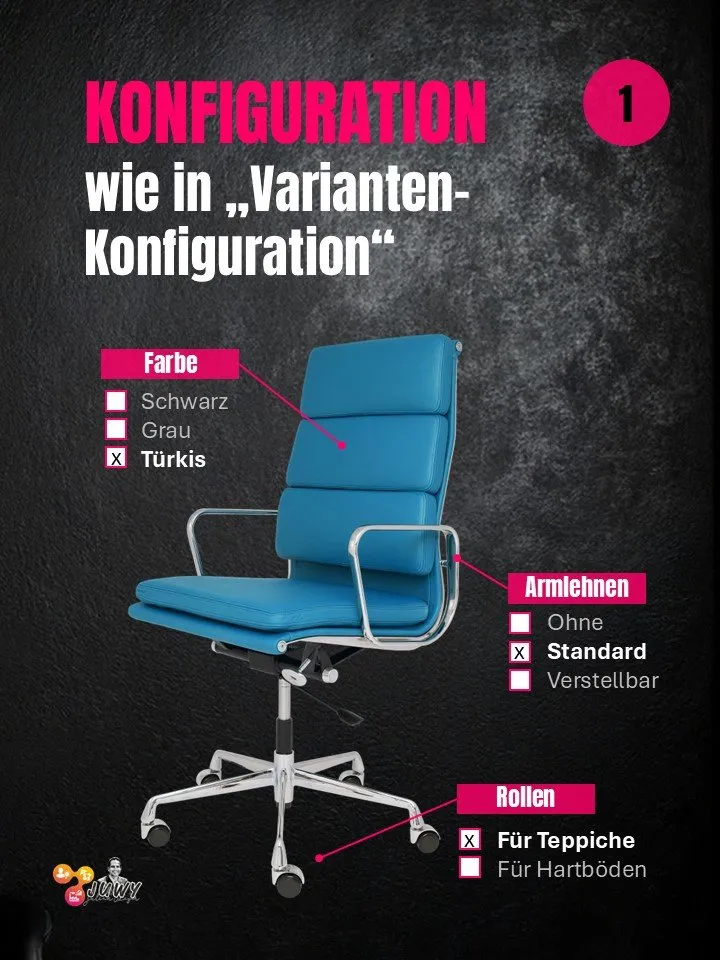
- Variant configuration
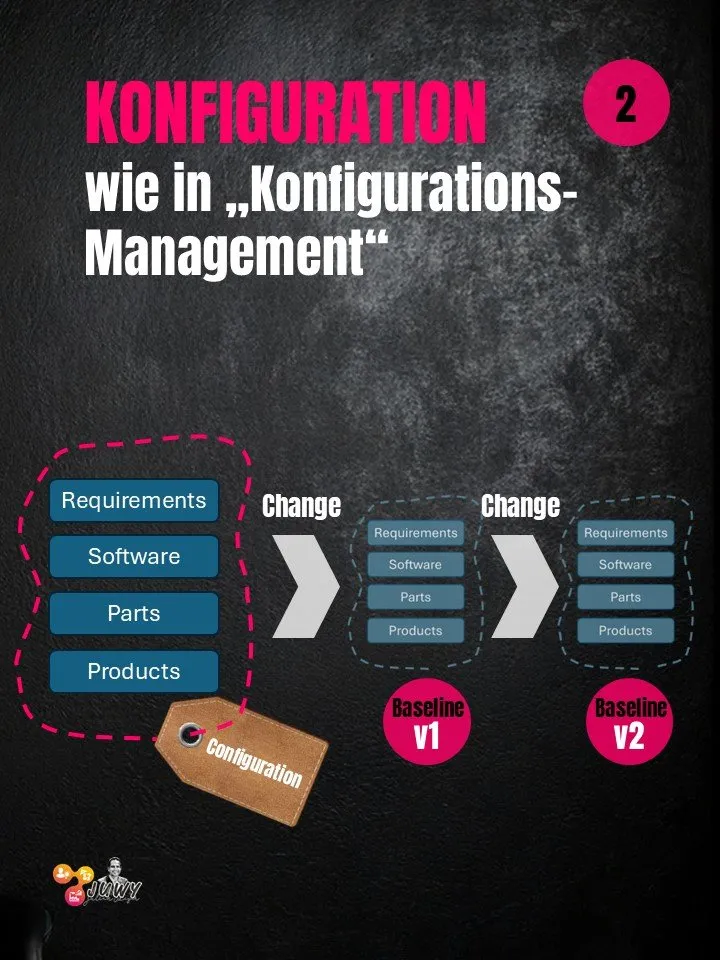
- Configuration in the sense of configuration management
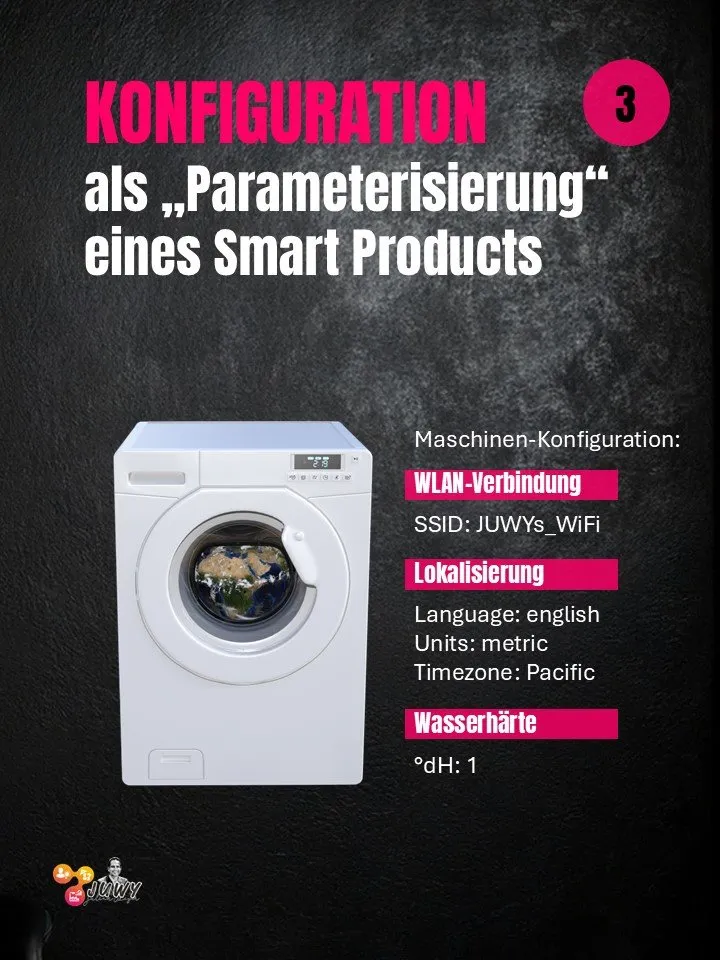
- Configuration in the sense of parameterization
To make the confusion complete: sometimes a project or process involves all three meanings at once, and they are somehow connected, too. More on that later.
Word origin
cōn-fīgere (Latin) to join together, to nail together
The prefix con- means “together” in Latin. And figere, as you might guess, means “to fasten”, “to attach”, “to fix in place”. A “figure” is nothing other than something “fastened together” 😉. And a configuration is therefore something “put together”, or more precisely, the process of putting together.
So with a configuration, I join individual components into something bigger. And seen from a bit of a distance, that holds true for all three meanings.
Different meanings of “configuration”
1. Variant configuration
A look in the dictionary helps here too: the Latin variare means “to make colorful”, “to alternate”, “to color”. So a variant is a particular “coloring” of my product, or the coloring of one of its components. And that is exactly what variant configuration is about: I (as a customer, for example) put individually “colored” components (variants) together into a product (putting together = configuration).
Want an example? I’m configuring a bicycle variant. I’d like the frame in the “coloring” trekking men’s bike, 54cm. Of course, coloring isn’t meant literally here; what’s meant is the variant of the frame. Then please add the gear shift in the 21-speed variant, the gel saddle, and all of it in navy blue (this time coloring literally).
Voilà, from individual variants of the components we have put together one (out of many, many possible) bicycle variants, in other words “configured” it 👍.
Strictly speaking, by the way, I think that in many cases one should really talk about variant selection rather than configuration. But that’s another topic, and I’ll certainly write about it too 😉.
2. Configuration management (e.g. ISO 10007)
If you use the search engine of your choice, you’ll find various definitions (e.g. ISO 10007 or ANSI/EIA-649). Here is one from ANSI, for example:
Configuration management is a management process for establishing and maintaining consistency of a product’s performance, functional and physical attributes with its requirements, design, and operational information throughout its life.
I like the ANSI definition a lot, because it contains important statements:
- It is a management process
- It ensures that the product conforms to its requirements
- … and all of that across the entire product lifecycle.
Whichever standard you base it on, it always works the same way at its core: if we are responsible for a product, we first have to define which “elements” are important to us (so-called configuration items). The notion of an element can and should be broad here. That means we look not only at the physical components (parts) of a product, but also at all the information that matters during development (and the entire lifecycle). So requirements, drawings, specifications, and so on. — Identifying these relevant configuration items is aptly called configuration identification in standards jargon. The configuration is then the set of configuration items that we identified as part of configuration identification. Clear so far? 😉
Here’s an example. Admittedly anachronistic and barely digitized, but it’s about the principle:
Ingo, the lead engineer at a bicycle manufacturer, is supposed to develop a new bike. To have proper configuration management, he (or his apprentice Anton) first sets up a file binder with various tabs, which could be:
- Requirements
- ISO 4210 (standard for bicycle design)
- Requirements from sales (what the customers want)
- Specification
- Frame
- Brake system
- Drivetrain/gears
- Manufacturing documents
- Frame welding drawing
- Assembly instructions
That completes the configuration identification; the configuration is created. Bit by bit, the currently valid, relevant information is now filed in the individual tab sections. In the ISO 4210 tab, that’s ISO 4210:2023, the current version of the standard for bicycle design. A little later, once the responsible design engineers have finished their work, come the design drawings for the frame, the brake, and so on.
In between, Anton (the apprentice) is allowed to photocopy the whole file binder once a week and put it in the archive (snapshot). At the latest when development is complete and lead engineer Ingo has released the maturity level of the specification, the photocopied binder gets “Design released” written on it in fat red felt-tip pen (AS-DESIGNED baseline).
How exactly configuration management ensures that a product meets its requirements, and what all of this has to do with traceability… I’ll write more about that another time, too!
3. Parameterization of a smart product
Setting your favorite background in the Windows operating system, adapting the CAD system to your own company’s needs, or entering the wheel size in the bike computer so that the speed is displayed correctly. In everyday language, all of this is also called “configuring”. To bring it back to the word origin of “configuration”: you could say you are putting together the individual switches and levers that the product offers you.
Perhaps a better term than configuration here is parameterization. My (software) product offers me various switches and settings, and for each I can set a parameter. In the case of the bicycle (computer), it is even a product made of software and electromechanical components. Anyone who works a lot with Linux will know the *.conf files (as in configuration), and some may still remember the .ini files under Windows. But the principle is always the same. By setting switches, you can influence the behavior of the software or the product.
Putting it all together (😉)
In the previous sections we learned that the word “configuration” can be used in very different contexts. In the introduction I wrote that, adding to the general confusion, the three contexts can also occur together in one project or process. As promised, a few words on that too.
Or first, an example:
From the very beginning, Viktor from sales wrote into the requirements specification for engineer Ingo that the bike should please be orderable with a frame for women and one for men, and also in different frame sizes. There should be three different brake disc sizes, and for the gears the customer should be able to choose between 21 and 27 speeds. And just like that, the configuration item “frame” of the configuration from configuration management is itself subject to a (variant) configuration 😉
As a result, of course, there are different (= variant) design drawings for the different frames, and with them different item and material numbers, by which these different frames are identified in the logistics process.
If the bicycle manufacturer is very thorough, then after I’ve ordered my bike, it will have the apprentice Anton make a new photocopy of the file binder as part of configuration management and label it AS-ORDERED by Julian Weyer. Everything I ordered (trekking men’s bike, 54cm, gel saddle, 21-speed gears, navy blue, we remember) is highlighted with a marker in my baseline, and all variants I didn’t order are crossed out or taken out of the binder (whether I myself ever get to see this photocopy of the binder is another story, but it’s about the principle).
The individual parameters of the bike computer (in everyday language, its configuration) can also be configuration items in the sense of configuration management. That means: before the bike is delivered, the mechanic who did the assembly and parameterization files the parameter data in my photocopied binder as well, so that it is always traceable in what state my bike was delivered to me (AS-DELIVERED).
Sounds complicated and confusing? Actually, I find all of this quite logical and coherent, as long as you are aware of these different aspects and place the project context correctly each time. When in doubt, it’s better to ask once more:
💬 What exactly do you mean right now when you talk about configuration?